Computer Update

I never updated my “loyal readers” (both of them?) about my “horrible hard drive experience” from April. This is where I purchased a good Seagate 300GB IDE hard drive and futilely tried to install it in my Dell Dimension 8250.

After that experience, presuming that my hard drive was bad, I went back to Fry’s and exchanged it for an identical hard drive. At first, I patted myself on the back, thinking that I correctly solved the problem. Nope. Not very long into using this new drive, I got the same blue screens of death (BSOD). Argh!

A neighbor let me borrow his PCI IDE card. (This is an add-on card that lets you hook up more hard drives.) The thinking was that the built in hard drive controller had some problem understanding 300GB hard drives. Again, nope. Even with this additional controller, I still got the stinkin’ BSODs! Clearly there is something about my system that doesn’t like large hard drives. What we figured is that when my hard drive is asked to seek past a certain, unknown point, something in the system crashes. I figure it is probably the BIOS or chipset.

Shortly after that, I sold the 300GB hard drive to a friend, and he’s happy with it.

Other updates from that April article:

  • The video driver BSOD is almost certainly a “false positive” caused by the hard drive. I think the video driver is fine. The same driver is on my old installation on my 80GB hard drive. I could not find anything on Google to suggest a bad driver.
  • I got the $20 rebate fixed–in two steps. I got the correct $50 rebate paperwork from Fry’s and sent it in. However, Seagate’s rebate processor only recognized it as a $40 rebate!  Huh? Fortunately, Fry’s fought that for me, and I received a $40 and $10 check in the mail a few weeks later. Fortunately for the guy who bought my hard drive, he didn’t have to mess with this fiasco. He got the post-rebate price, and he didn’t have to pay tax, either.

Fast forward to a few weeks ago. Searching through Dell’s site, I discover that Dell says the largest hard drive it tested on an 8250 is 200GB. So I dutifully wait for sales on large hard drives no more than 200GB. Eventually, CompUSA had a Seagate 200GB IDE hard drive for $0.25 per GB. (This drive is in fact almost identical to the earlier 300GB model except for its size.)

Brought it home, set it up, installed Windows, and dang it, the system crashes again, and in the same way!

At this point, I had “had it” with this Dell. It’s almost impossible to upgrade: neither reasonable hard drive upgrade worked, and there is no telling how many more hard drive purchases and returns I would need to do before finding a working solution; it needs another RAM upgrade with spiffy, expensive RDRAM; its 2.4GHz Pentium IV is already chugging; and the 80GB hard drive is almost full.

I girded my loins for a small spending spree.

Deciding what to get took some research. First I compared building my own system to buying a complete system. I couldn’t find a complete system that has exactly what I need. Since I am already licensed for Windows XP through SMU’s “work at home” provisions of our Microsoft software license, I didn’t need Windows. So these Windows installs were adding about $75-$100 to any complete system.

Sometimes you can get OS-less machines, or machines with free OSes like linux variants. Dell had some of the “free OS” systems in their small business area, but all of their systems were priced too high. Tip for buying from Dell: be very careful when customizing a system; Dell gouges customers on upgrades. For example, the list price for upgrading a base Dell Precision 380n from its stock 512MB to 1GB–a net gain of 512MB–is more than what you could pay for two 512MB sticks of equal quality from reasonably priced component vendors!

At one point, I also considered a Hewlett Packard Pavilion a1250n. While that has the Athlon dual core processor–which would have been really nice–it was several hundred dollars more than an acceptable home-built system. Plus it has an inferior shared memory configuration, where the video card uses the main system memory. Not only does this reduce the amount of available memory, it results in a slower system.

I decided to go the home-built route. With the help of invaluable advice of Wikipedia and various online hardware review sites (many of which are not neutral, by the way), I found that AMD Athlon processors almost always give a lot more processing heft for the dollar than Intel Pentiums. After hemming and hawing over configurations, I settled on the following:

  • AMD Athlon 64 3500+ (Venice core, socket 939)
  • 1GB of PC400 DDR RAM, configured as two 512MB sticks so I can utilize dual channel memory addressing
  • Gigabyte GA-K8NF-9 NForce4 motherboard. (Didn’t need the SLI versions because I don’t do video games)
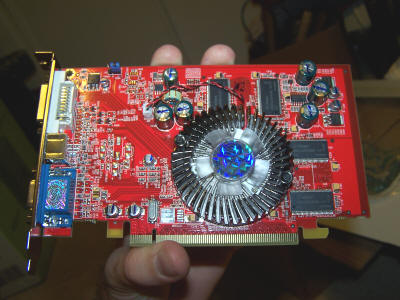
  • Sapphire Radeon X550 PCI Express 16X video card with 256MB RAM (don’t let the specs fool you, it’s not an expensive card)
  • A case with a 420W power supply (the Dell case is too proprietary to work with non-Dell motherboards)

I ordered all the parts from newegg.com, and I received all of them yesterday. That evening, I slapped everything together. That experience reminded me of the 3 years I was a co-owner of Scarsdale Computers in Houston. I can’t count how many systems I built through that company.

A shot of the motherboard in the case:

Motherboards sure have become colorful!

This is the Athlon 64 chip resting in the Socket 939 socket:

On top of it sits a huge heat sink and fan:

Memory is installed:

This is incorrect, by the way. The memory should have been in slots 1 and 2 for proper dual channel operation, not 1 and 3. I corrected this later.

The video card:
I used the 200GB hard drive I talked about earlier.

I hooked everything up, plugged the case into the wall, turned on the power, and…

NOTHING!

The fans spun up, but that’s it. No response. No error beeps. Nothing.

Argh! Argh! Argh! Argh!

I played around with the system enough to be reasonably confident that either the CPU or the motherboard are bad. The next day, I took the parts to a guy who had a spare Athlon 64 system. After some parts swapping, he found that the motherboard is bad. So I immediately got an RMA from newegg.com, and the motherboard is on its slow journey back to California.

I look forward to having a newer computer. I’ll let you know how it works in 2 weeks.

What is going on with the 832 area code?

UPDATE (10-19-05) is below.

For the past two nights, I have had great trouble calling numbers in the 832 area code. Nearly every time, I get a message saying “all circuits are busy.” I get this same message regardless if I use my Sam’s Club calling card (a bargain, by the way), my home phone (long distance), or my Sprint PCS cell phone.

Both of the numbers I am trying to call are also Sprint PCS phones. I though that Sprint-to-Sprint calls would be routed directly through the Sprint network and not go through the POTS, but I am apparently mistaken.

UPDATE (10-19-05): Two informed sources told me that there are call routing problems in the Houston area because of Hurricane Katrina. A lot of the telephone networks in New Orleans are broken, so calls are instead being routed through other networks such as the ones in Houston. Phone networks only have limited capacity, and the load in Houston is apparently overwhelming some parts of the network.

Stolen: Wallet, Wedding Ring, and Pocket Knife

Today, while working out at the new SMU gym, my locker was opened, and my wallet, wedding ring, and pocket knife were stolen. Fortunately, since I use my PDA while working out, I still have my PDA.

I know for sure that at least one other person’s stuff was stolen.

My lock was a classic Master Lock Combination Padlock. It had a pink dial. Back when we lived in Groves (late ’80s), we picked it up at a grocery store on the way to the Port Arthur YMCA one night. (A family member worked there briefly, and we had a membership during that time.) When I came back to my locker after the workout, the lock was gone.

Fortunately, a cop was already at the gym taking the other guy’s report, so I was able to quickly make a report. The cop thinks a thief may have entered with a bolt cutter, although I wonder if the thief had a shim? These Master Lock combination locks are surprisingly easy to open. I will never use that trash again.

The ring was sitting in the locker, but my wallet and knife were in pants pockets. The thief was nice enough to zip my backpack shut when he was done. How courteous!

My wallet had about $80 cash, my credit cards, my driver’s license, my SMU ID, and other less important things.

I first called MBNA to cancel my MasterCard. After waiting on hold for 13½ minutes and reaching nobody, I hung up and called my bank and other card issuers. That was tragic for MBNA. Had MBNA not been negligent and actually had enough operators or an expedited path for fraud alerts, then $2,500 of fraudulent purchases could have been avoided. Yup, you got it, about 30 minutes after I hung up with MBNA, someone made three fraudulent purchases totaling around $2,500 at stores in the CityPlace Market, a shopping center with a Target and some other stores. I’m sure the merchant is going to eat the cost of these purchases, though, because merchants are supposed to verify that buyers are who they really are. (When is the last time a merchant has asked to see your driver’s license when you made a purchase?) My wife was finally able to get through to MBNA as the third fraudulent transaction was being placed. The other credit card companies and my bank immediately answered my call.

I am now questioning why I have an MBNA account. MBNA once fined me because I paid a balance too early (yes, literally, I was fined for paying too early–I made them credit me that fine), another time they fined me because their web site screwed up my payment (they credited me that one, too). Their web site is awful, and they don’t directly integrate with Microsoft Money (i.e., they haven’t bothered to allow Money to automatically download transactions). Now, their inept customer service department is causing a hassle. Because of the size of the fraud, I am now having to sign an affidavit that the transactions were truly fraudulent. Why should I bother with such a crappy company? http://www.mbnasucks.org/

Shame on you, MBNA!

The good thing is this is apparently random crime, and it is all replaceable stuff. Well, I cannot get my original wedding band back unless it is sold to a pawn shop.

The cop said that he was not aware of a history of crime problems at the gym. In all likelihood, the thief was taking advantage of the fact that the gym just opened on Sept. 26.

You know what’s strange? SMU is supposed to be one of the safest places in the Dallas area. Despite this, this is the second time something has been stolen from me at SMU. Back in 1999 or 2000, a Sony Walkman was stolen from my desk. Somehow, I managed to get through my undergrad years without any losses.

Relandscaping, Part 3

Be sure you read part 2 before reading this.

At this point, we are ready to order landscaping materials. We shopped around. I got a good price at Living Earth Technology because I was able to use their wholesale prices due to a connection I had with one of their largest customers. (You may be able to get wholesale prices if you just fill out their wholesaler application. Or if you know me and need materials, talk to me. I may be able to get you a discount.)

We ordered 5 cubic yards of compost, 5 cubic yards of azalea soil, and 3 cubic yards of pine bark mulch.

Two of our very generous friends showed up at 8:30 AM on Saturday, Oct. 1. Shortly afterwards, Living Earth’s truck showed up:

Oh, my gosh, I didn’t expect such a big truck!

That huge thing takes up almost all of my driveway:

Here it is dumping out the materials:

Living Earth dumps each material in the dump container, separating them with thick plastic. The driver raises the dump container just enough to dump out the first load. Then he moves forward a bit, raises it further, and empties out the second load:

You’re seeing the pine bark mulch on the ground. In the bed is the azalea soil, and under that, under plastic sheeting, is the compost.

Now all the azalea soil is on the driveway:

Emptying out the final load, compost:

The aftermath:

Left to right: compost (stinking like poop with flies circling all over it), azalea soil, and pine bark mulch.

I am pretty sure they gave us more of each material than we ordered.

First order of the day was to retill the flower bed by the front sidewalk. It turns out we needed to have gone much deeper than we did. Here the dirt has been shoveled out and is waiting for a retill:

I didn’t take many more pictures of the day’s events, but here’s what we did next. We retilling that bed and then tilled in over 3″ of compost. Then we tilled in about 3″ of compost to the second tier of the rest of the front landscaping, and we filled in the bottom tier (the dished out area) with azalea soil. That took us until about 1:30. Here’s the aftermath:

After that, we had lunch and then went into the back yard. We had to completely retill the “easy” part of the back yard beds to get a deep till. Then we added and later tilled in a generous amount of compost:

The above picture was taken at 6:10 PM. Remember that we had been working since 8:30 AM with few breaks! That was a LONG DAY!

The other side of the back porch was a mess. It had never been tilled right at all, it was full of tree roots, and it has a drainage problem. One of the guys and I spent almost the whole afternoon surgically removing as few roots as we could manage and digging a trench for some 4″ plastic perforated landscaping pipe I am going to use to correct the drainage problem.

Those two guys ended up staying until 8:00 PM. That’s right, almost 12 hours of help in the hot sun. They were beat!

By the way, we had to get rid of the gas lamp. It had rotted out around the base:

It sits waiting to be hauled off:

By the way, some people had hypothesized that the reason this lamp didn’t work right was because of a clogged gas line. Nope, the line was fine:

The next day, Sunday, Oct. 2, Jennifer and I spent the afternoon and early evening finishing out everything. We added more compost to beds and mulched almost everything.

I spent more time on the difficult part of the back yard. Here is what I ended up with:

I got it prepped fairly decently, but I stopped because of the tree roots. I have since checked a few web sites and consulted with a respected landscape architect, and I really don’t have much to worry about as long as I limit my cutting to the 3½ foot width of this bed. The tree is a healthy, mature American elm, and I would only be disturbing a small portion of its entire root system. Because we live in a moderately dry area, this tree’s roots probably go at least 10-15 feet deep. If the tree’s root system could be seen as a pie, I am only affecting one small sliver of the pie.

That tree is in the center of this shot:

So this upcoming weekend, I will probably cut out the remaining roots and deeply till and prep the remainder of that bed.

By the way, I discovered what half the drainage problem was:

The gutter was full of leaves, so water couldn’t even get to the downspout.

Here’s how everything looks right now.

Back yard (the not difficult side):

Nicely mulched and “ready to go” front beds:

More of the same for the front:

One thing I am not sure about is whether this steep of a slope of azalea mix can withstand heavy rains. I may need to add a row of railroad ties across the front.

Our plants come in this weekend! We’re excited!

Relandscaping, Part 2

This is a long-overdue update on our landscaping project. In the last update, I told you about how we are re-landscaping the front yard. We’ve since expanded the project so that we are re-landscaping all the beds around the house. Yup, front and back yards. After we’re done with this project, the only landscaping left will be a hedge around the fence.

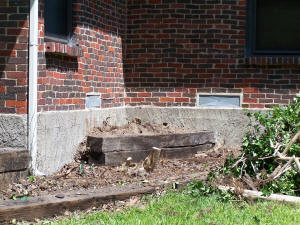
The last update was on August 21. At that time, we had just cleared out all the plants in the front landscape, although I still had to spend extra time on a ligustrum stump, visible in front of the two stacked railroad ties:

This is all that was left of a multi-trunked, 15 foot high ligustrum semi-tree. I had to stop because I had been outside all day in the 100+ degree heat, and I uncovered a bunch of fire ants.

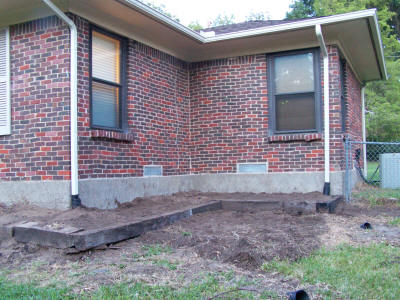
Fast forward a few weeks to Sunday, Sept. 18. By this day, I had finally removed the stump. With the help of a friend, we spent another hot Sunday afternoon building up the tiers on that side of the house. The stump is gone, and we have a bed that completely wraps around the front of the house:

(By the way, notice the warm light from the window? You wouldn’t get this with a normal daylight picture. This is a 1 second exposure time, 400 ISO shot I took at 6:43 PM on 9/21/05. It was too dark to take pictures except under this special mode.)

If you looked carefully, you’ll also notice that we buried the gutter outflows underground. They now drain into the lawn. I still need to finish this off with a better water distribution system, but for now this keeps the water away from the beds.

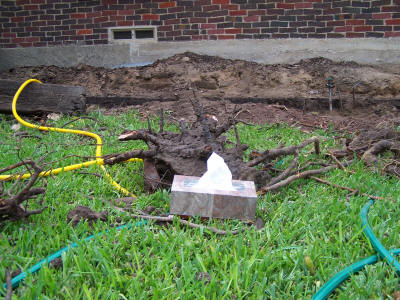
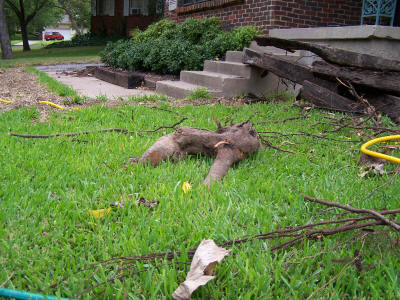
Now jump to Saturday, Sept. 24, the day that Hurricane Rita was menacing east Texas. Rita gave me a great 10-15 MPH breeze to keep the temperatures down but no rain! Oh, well, the lack of rain gave me another day to work on the cherry laurel tree roots. I pulled out more large stump pieces:

(Box of facial tissues provided to get a reference on the stump’s size.)


They may not seem like much, but when all you have is shovels and a Sawzall, ripping out these stumps is a major achievement.

I also noticed where cherry laurel roots grew between the stacked railroad ties, so off came two sections of railroad tie!