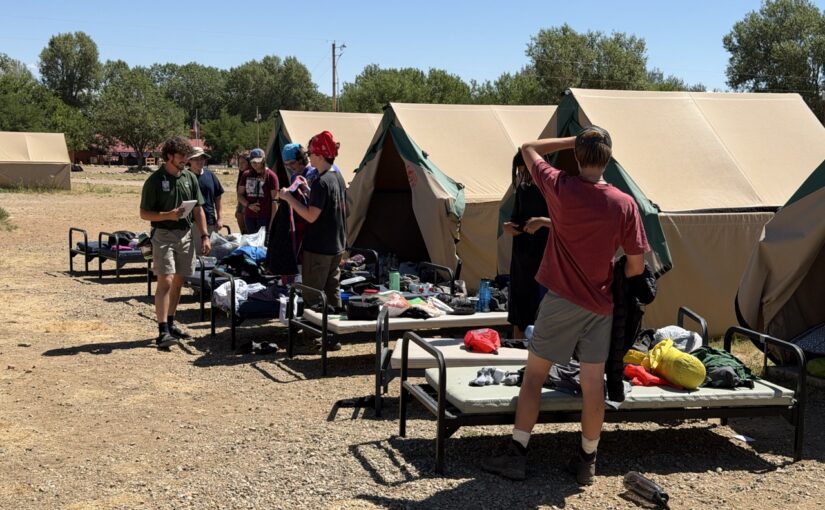
Philmont backpack packing list: my deltas

I did a 12-day1 Philmont trek in late July 2026, trek 12-12. I packed using the Philmont 2026 Guidebook to Adventure (p. 14), with some exceptions. My LighterPack inventory is at bottom.

The Philmont packing list is good. I recommend packing everything on it. I brought a few more things, described further down.

Before you take off hiking, you’ll review gear with your ranger. That is when you may choose to leave some items behind. It’s better to bring too much to Philmont and leave a few things at base camp than to lack essential equipment for a trek!

I packed everything I needed

The Philmont list, plus a few extras (below), is comprehensive. I cannot identify anything I wanted to bring that wasn’t present.

A factor in why I had all I needed was because I packed towards the high end of ranges. If the list says “up to 4” of something, I brought four. If four is too many, you can leave some behind at base camp. By bringing four, I could make that choice!

On-list item commentary

This is a commentary on items on the Philmont packing list.

Items I left behind

Here’s the items on the Philmont list that I did not bring on the trek:

  • Extra headlamp batteries. I had a Black Diamond Spot 400 Headlamp with its included non-rechargeable AAA batteries. I didn’t even chew through 1/3 of the batteries. Also, a trading post was available to me on day 6 in case I needed more.
  • Long underwear. I left them at base camp. This was per our ranger’s recommendation, and he nailed it. At no point did I feel these were necessary. On the coldest mornings at 10,500 altitude, all I needed was a jacket until the sun was on me. While the trek felt warmer than I expected, possibly fueled by the extreme drought, I see a lot of reports of warm conditions from prior years, so I am unclear if the warmth was unusual.
  • Lightweight fleece. It was unnecessary with my insulated jacket. This was great because my fleece wasn’t lightweight, just over 1 lb!
  • Water filter. Based on the advice of my ranger, I left this behind, and we only used purification tablets. (I brought my personal filter for crew gear.) It was the right call. We rarely needed to purify water, and the water sources we used seemed pretty clean. That said, we saw two situations where, had we solely relied on purification, it may have been weird: 1. In the hike to Clear Creek, Rayado Creek became muddy during a rain. Purification tablets cannot clean up dirt. This wasn’t impactful because Clear Creek had treated water. 2. Bonito Creek felt like a cow toilet. Its watershed includes a lot of cow pastures. Will a filter work on the poop? Not sure. But seems like two kinds of treatment there would be desirable.

Items I should reconsider

These items I brought, but I am not sure they were useful:

  • Camp/stream shoes. I am not sure these are needed. I got my first-ever pair of Crocs. They are a big “meh” overall, stupidly overpriced. A lot of days, I never took off my boots at night, and that was fine. Also, we encountered no streams that my waterproof boots were wrong for, but Philmont was under extreme drought at the time, which suppressed water levels.
  • Sleep clothes. Never used them.
  • Gloves and warm hat. Never used them.
  • Camp Chair. My REI Flexlite Air Chair was a meh. It occasionally had minor usefulness, but that was 1.06 lbs that I could have dropped. I am not sure the weight-cost was worth it.
  • Trekking poles. I can’t objectively say they benefited me. They may have helped catch a fall twice. However, there was no A/B test, so I don’t know if I would have carried myself better without the poles or if not, would have have caught the fall. The surprise was more that I had ordinary TrailBuddy poles, which aren’t particularly lightweight. They were fine! I had them on my backpack only the first trail day. The rest of the time, I was walking with them.
  • Foot powder. This was crew equipment. Never needed it.

Items that did not work well

These items did not work well:

  • Rubber tips for trekking poles. On day 8, hearing clicking sounds, I observed my poles had broken through both rubber tips. Except for hiking day 1 (trek day 2), I used the poles vigorously to transmit some forces from my legs to my arms.

Items that surprised me

These were items I got for this trip whose utility surprised me:

  • Sleeping bag liner. It did well at protecting the sleeping bag from my nastiness. I washed it on day 7.
  • 75L backpack. Several poo-poohed my choice of a 75L pack, saying it’s too large or too heavy. I found my Gregory Baltoro 75 it to be about right. On days where I needed to bear a bigger load, it made that possible. On other days, it easily cinched down to be a lower volume. (I got this at a considerable discount on closeout in the two years before our trek.)
  • Sleeping bag. My Kelty Galactic 30 Sleeping Bag is a down hikers bag, rated to 30º. It was too hot most nights, which typically were 50º to 60º. The overheating was a contributor to mediocre sleep. That said, it got cooler the two nights we were above 10,000 feet (Clear Creek and Red Hills), and it was appreciated! (I got this at a considerable discount on closeout in the two years before our trek.)
  • Rain pants. The time I didn’t wear them, I misjudged the rain storm. My boots got soaked! Wear them!
  • Coghlan’s Snapfold Bowl. This lives up to the hype! It’s not a smellable, it’s light, and it snaps to a durable, flat shape. (Fozzils was the original brand of these bowls. It was acquired by Coghlan’s in mid-2024.)
  • Jetboil. Someone else brought this. It was quite handy at warming up coffee water or miscellaneous, small hot-water needs. Far simpler than breaking out the MSR Whisperlite.
  • Wool socks and sock liners. My wool socks seemed to hang on to water. When I washed clothes, they were always the last things to line dry. I want to investigate this further. But I had synthetic sock liners, too. These were among the first things to dry, so I imagine they did good at transmitting water away from my feet. Despite waterproof boots, with the sock liners and the wool socks, my feet never felt soaked, just sometimes slightly moist. (Exception: see the rain-pants item above.)

Beyond the Philmont list

These items were not on the official list, and I found them useful:

  • Tent. Philmont recommends using tents they issue. I instead brought a Big Agnes Copper Spur HV UL2 tent. I tented alone as the odd adult male, and this was much lighter than the Philmont tent. (I got this at a considerable discount on closeout in the two years before our trek.)
  • 1 gallon freezer bags. These were handy for on-trail clothes washing or containing stuff. I brought five.
  • Power bank, Apple Watch fast-charging cable. I brought an Anker 20000 mAh power bank. It gave me a nightly charge of my Apple Watch Ultra 3 (got this used!). I also got occasional charging of my iPhone 17 Pro Max (also got this used). The Apple Watch charges were needed because I tracked our trail progress on all hikes. I was charging it from around 30% each day. Pro tip 1: remove the watch and charger when the watch is at 100%. I think there’s a parasitic drain from the induction charging if you leave it plugged in. Pro tip 2: Put the iPhone on low-power mode and on airplane mode. If you know you won’t use it for a few hours, power it off. I had to get exceptionally aggressive on power use starting day 5 as I had drained my power bank excessively due to my loose power management of the phone.
  • Instant coffee. My staple was illy Instant Coffee Single-Serve Packets. They were fine. I’ve previously used Starbucks Via packets, and those are also good.

LighterPack inventory

I created this list before departing. I weighed all items individually.

Wow, you made it all the way here? If you want more Scouting content from a reformer angle, check Untended Fire. Many changes are needed if we want for BSA to have another 100 years.

  1. All Philmont treks include two days at base camp, so a 12-day trek is really 10 days in the backcountry. ↩︎
FAQs are bad

FAQ means frequently asked questions. On websites, they are a set of questions and answers.

FAQs signal poor products. They obfuscate.

FAQs are not helpful.

Not frequently asked

FAQs aren’t responsive to frequently-asked questions. FAQs are the questions someone wished people asked.

But for the sake of argument, let’s suppose your FAQ is real: it’s responsive to questions are frequently asked.

Congratulations, you’ve found a unicorn. But again, for the sake of argument, let’s pretend this unicorn is real. Why are people are frequently asking questions? Here’s why:

Your product sucks

A FAQ’s main point is papering over failure.

Good products and good documentation minimize questions.

Improve your product! Invest in eliminating user questions.

FAQs obfuscate

FAQ-style documentation obfuscates. By bloating heading length, they make it harder to find information.

Simple headingFAQ-bloat heading
Data typesWhich data types may I choose?
(300% bloat)
Log inHow do I log in to AwesomeApp?
(350% bloat)
Scholarships offeredWhat types of scholarships does State University offer?
(400% bloat)
One-on-one contact always disallowed“The Barriers to Abuse states ‘One-on-one contact between adult leaders and youth members is prohibited both inside and outside of Scouting.’ What does ‘inside and outside of Scouting’ mean?” (source) (725% bloat)

FAQs are bad habits

Sometimes good documentation is harmed by conveying it as a FAQ. This comes from a baseless belief that friendly, approachable formats are wordy or busy.

Never do this! Construct your documentation in a straightforward way.

FAQs are a last resort

If you feel you need a FAQ, do these first:

  1. Improve your product to eliminate questions.
  2. Improve your documentation to eliminate questions.
  3. Do anything other than a FAQ.

If after following these steps, you still need a FAQ, then fine, do it. But only do it with a plan to eliminate it. And only do it if it’s answering questions customers are frequently asking.

The FAQ is a last resort. It makes you look bad. It needs to disappear at the earliest opportunity.

US Youth Soccer screws over 1/3 of its kids

US Youth Soccer is changing. Soon, all youth soccer leagues will use calendar-based teams.

This is a mistake. In most states, the new system gives around a third of its youth new reasons to quit. It also makes determining age levels more confusing.

First, some background. I am in Texas. We use Sept. 1 for the cutoff for kindergarten. Children start kindergarten if they turn six between September 1 and August 31 of the following year. More than half the states use the same or a close date. (source)

The soccer year starts a month earlier: August 1 through July 31. This creates a small “twilight zone” for August birthdays: they get grouped with prior-grade kids. The fix is easy: August kids can “play up” with same-grade friends.

Here’s an example: I coach a U7 soccer team. U7 means the kids turn 7 this soccer year.

One of my boys has an August birthdate. He’s U6 in soccer despite being in the same grade as most U7 boys. Again, the fix is easy: he plays up into U7 to be with his same-grade friends.

The new, calendar-based system expands this “twilight zone”. It is 300% larger now, affecting 1/3 of my team instead of 1/12. It is also less forgiving. Here’s why.

Starting fall 2016, 1/3 of my team becomes U9, and 2/3 will be U8. This will happen to all existing teams with evenly distributed birthdates.

You can’t “play down” in soccer. That means my team’s older 1/3, who will be U9, cannot stay with their same-grade friends in a U8 team.

The younger 2/3, the U8s, could “play up” into U9. That’s unlikely: I doubt they will be ready.

If that’s not enough, you also have the relative age effect. This effect is where kids who would be the youngest on a team–birthdates towards the end of the selection period–are less likely to participate.

This makes sense: at younger ages, a many-month spread can mean a great deal in readiness for sport, both physical and psychological. This is not a new problem.

In a FAQ, US Youth Soccer downplays the relative age effect. They say calendar-based teams weren’t designed to address it. They omit that the change will make it worse.

Why? Remember the third in the “twilight zone”? They have a double whammy! They are the youngest on their teams. In addition from being separated from 2/3 of their friends, they are also hit with the relative age effect!

Calendar-based teams makes things more confusing for parents. The year used in the calendar-based system is the second year of a season. That is, for the 2016-17 season, 2017 is the year used for age eligibility.

At least in Texas, recreational soccer follows the academic year. Fall ’15 and spring ’16 are one soccer year. The current system, with the August 1 cutoff, complements the academic year. Same-grade kids are generally put in the same soccer age division. I can’t imagine anything easier.

Currently, the x in Ux stands for the age your kid turns during the soccer year. In the calendar-based  system, Ux is arbitrary and hard to figure out. Suppose a child has a November birthdate. When he enters soccer in the fall, his age division is based on the age he turns in two Novembers!

Suppose Little Sammy was born in November 2008. When you sign Sammy up for soccer in August 2016, Sammy will be seven years old. However, the age chart shows that Little Sammy will end up in U9 soccer! In other words, when Sammy signs up in August 2016, his age division is based on the age he turns in November 2017!

Why is US Youth Soccer doing this? Two reasons.

First, the “new calendar year system makes soccer easier”. (source) Except it doesn’t!

Second, it “makes it much easier for us to scout for the National Teams and find players ready to compete internationally.” (source) Wait, we’re increasing confusion, creating a new disincentive for a third of youth players, butchering teams, and making life hard for coaches, all for something that is a concern for vanishingly few players?

I’m not clear who’s best interest is in mind here. It’s not the families, the players, the teams, or the coaches!

(A note: US Youth Soccer is also switching to small-sided games. I support that change.)

Where most traffic tickets are written in Dallas

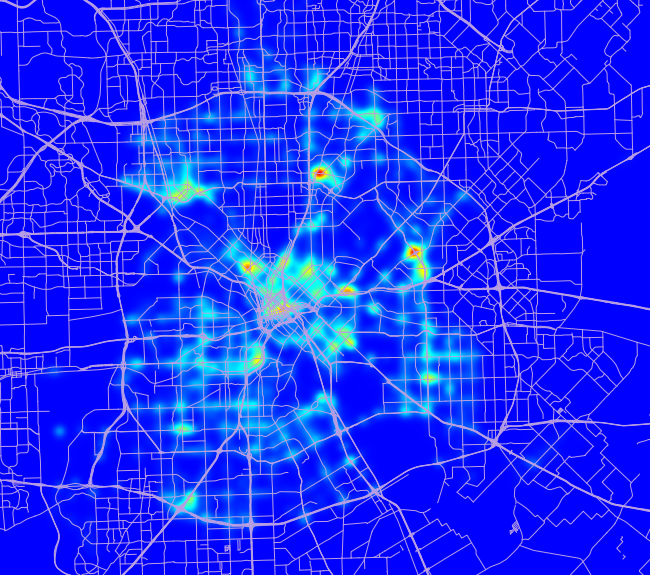
Wondering where most traffic ticket are written in Dallas? The below heatmap is from a dataset that includes Dallas (city) tickets 2004-2012 and Dallas County tickets 2006-2012. (Beginning and end years are partial.)

I am assembling this dataset for my in-progress doctorate. (I am a doctoral candidate.)

Heat map of traffic tickets written in Dallas

A couple of notes to help interpretation:

  • This is for all officer-written traffic tickets: speeding, red light running, paperwork violations, equipment violations, etc.
  • Does not include:
    • Tickets unrelated to traffic, like disturbing the peace or drug possession.
    • Parking tickets.
    • A modest % of tickets that I could not geocode due to no address, bad address data, or limitations of my geocoder.
    • Portions of Dallas outside Dallas County.
    • Tickets written by other jursdictions. I left out Texas Department of Public Safety because they have hardly any activity in Dallas County except for NTTA freeways. Dallas heavily patrols the NTTA-owned Mountain Creek Lake Bridge, however!
    • Tickets sent directly to county courts instead of municipal or JP courts, like DUI.
    • Automated ticketing machines like Dallas’s red light cameras.
  • This may modestly understate Dallas County sheriff and constable tickets because I have about 2 more years of Dallas city tickets in here.

I find it surprising that the most significant traffic enforcement activities are generally not along major roadways, but rather are in areas of town commonly perceived as dangerous.

Two huge peaks are at the Five Points area (Park Ln. east of US 75) and Ferguson/Buckner. Other obvious areas of emphasis:

  • Downtown
  • Maple and Wycliff
  • Just north of Bachman Lake
  • Pleasant Grove
  • Oak Cliff
  • Fair Park
  • North Skillman
  • Red Bird area

It’s as if traffic enforcement is largely being used as a pretext for arrests and searches that might otherwise be difficult to pass constitutional muster. That may be interesting as commentary, but it is not a focus for my research. I’m really focucing on the safety effect of enforcement.

There is an apparent focus on intersections, although it’s possible that this is an artifact of officers writing in the nearest intersection for the ticket’s address.

Is Flying Colors Sports’s Great Amazing Race a scam?

(UPDATE: Flying Colors Sports’s owner Greg Benton posted a response in the comments below.)

Yesterday, my son and I did a family race.

It was called the Great Amazing Race, put on by Flying Color Sports. It’s supposedly a lighter version of the same thing you can see on TV.

It was neither great nor amazing.

It’s presented like a charity:

Here’s a problem: this “charity” has the patina of a loose, for-profit operation:

  • No IRS-recognized charities have names beginning with “flying colors sports” or “active families“. In fact, Flying Colors Sports is an Ohio for-profit LLC that was chartered in 2004. Ohio had no business on record beginning with “active families”. (Search for yourself.)
  • Through Google, I can’t find clear evidence of anything charitable these Active Families 30 or Active Families 60 charities have done, or that they even exist!
  • The event organizer said Akwasi Owusu-Ansah was supposed to attend but couldn’t because he was just traded. Um, no. It was January 15. He had been traded 6 weeks prior, on Dec. 4.
  • Poorly run, disorganized event, especially for something that cost between $30 and $50 per family.
  • No trained medical staff, or if they were there, they were well-hidden.
  • Was run worse than many free Cub or Boy Scout events I’ve been to.
  • Low-quality, sloppy web site with poor poorfreading, like “Norbuck Par” or “I-365” (it’s I-635!). In fact, it’s just thrown together with Godaddy’s free Website Tonight tool (see bottom of most pages).
  • The promised race packet was just a green, generic bifold flyer with no useful event details.
  • Credit card data is transmitted with no security and converted to email, which is inherently insecure.
  • No runner identification whatsoever. It’s all on an honor system basis. I could have easily scammed my way into the event.
  • Instead of “8 fun-filled stations“, there were six, and they were silly: 1. blindfolded guide, 2. sponge relay, 3. mummy wrap with toilet paper, 4. golfing a tennis ball into a hula hoop, 5. “hold the football between your legs while you go around some cones” and 6. a bingo game. Yes, the last station is really a game of chance, where you watch slower people get lucky and pass you up! Sure, these were enjoyable, but not $30-$50 per team enjoyable!
  • Purportedly tax-deductible donations are to be sent to the private residence of Donald and Karen S. Helton at 7858 Red Fox Drive, West Chester OH 45069.
  • The company’s headquarters are at the private residence of Gregory L. and Michelle R. Benton at 8270 Miranda Place, West Chester OH 45069.

So what’s the truth? Is there really any charity behind this?

I don’t know.

It could be that this is all legit, and some charity puts on an overpriced, over-promoted, hokey event run by a marketing firm that communicates poorly.

But it’s also possible that this is only a for-profit enterprise. If that’s true, it would be shameful. They would be getting undeserved free labor, and they would pretty much be pocketing money from families’ charity budgets.

Either way, participants deserve the truth, and they deserve something better than a brief, sloppy event for $30-$50, and taxpayers deserve for a charity to be organized properly, with IRS recognition.