Is Flying Colors Sports’s Great Amazing Race a scam?

(UPDATE: Flying Colors Sports’s owner Greg Benton posted a response in the comments below.)

Yesterday, my son and I did a family race.

It was called the Great Amazing Race, put on by Flying Color Sports. It’s supposedly a lighter version of the same thing you can see on TV.

It was neither great nor amazing.

It’s presented like a charity:

Here’s a problem: this “charity” has the patina of a loose, for-profit operation:

  • No IRS-recognized charities have names beginning with “flying colors sports” or “active families“. In fact, Flying Colors Sports is an Ohio for-profit LLC that was chartered in 2004. Ohio had no business on record beginning with “active families”. (Search for yourself.)
  • Through Google, I can’t find clear evidence of anything charitable these Active Families 30 or Active Families 60 charities have done, or that they even exist!
  • The event organizer said Akwasi Owusu-Ansah was supposed to attend but couldn’t because he was just traded. Um, no. It was January 15. He had been traded 6 weeks prior, on Dec. 4.
  • Poorly run, disorganized event, especially for something that cost between $30 and $50 per family.
  • No trained medical staff, or if they were there, they were well-hidden.
  • Was run worse than many free Cub or Boy Scout events I’ve been to.
  • Low-quality, sloppy web site with poor poorfreading, like “Norbuck Par” or “I-365” (it’s I-635!). In fact, it’s just thrown together with Godaddy’s free Website Tonight tool (see bottom of most pages).
  • The promised race packet was just a green, generic bifold flyer with no useful event details.
  • Credit card data is transmitted with no security and converted to email, which is inherently insecure.
  • No runner identification whatsoever. It’s all on an honor system basis. I could have easily scammed my way into the event.
  • Instead of “8 fun-filled stations“, there were six, and they were silly: 1. blindfolded guide, 2. sponge relay, 3. mummy wrap with toilet paper, 4. golfing a tennis ball into a hula hoop, 5. “hold the football between your legs while you go around some cones” and 6. a bingo game. Yes, the last station is really a game of chance, where you watch slower people get lucky and pass you up! Sure, these were enjoyable, but not $30-$50 per team enjoyable!
  • Purportedly tax-deductible donations are to be sent to the private residence of Donald and Karen S. Helton at 7858 Red Fox Drive, West Chester OH 45069.
  • The company’s headquarters are at the private residence of Gregory L. and Michelle R. Benton at 8270 Miranda Place, West Chester OH 45069.

So what’s the truth? Is there really any charity behind this?

I don’t know.

It could be that this is all legit, and some charity puts on an overpriced, over-promoted, hokey event run by a marketing firm that communicates poorly.

But it’s also possible that this is only a for-profit enterprise. If that’s true, it would be shameful. They would be getting undeserved free labor, and they would pretty much be pocketing money from families’ charity budgets.

Either way, participants deserve the truth, and they deserve something better than a brief, sloppy event for $30-$50, and taxpayers deserve for a charity to be organized properly, with IRS recognition.
Google Maps API V3 geocoding with SharePoint 2010

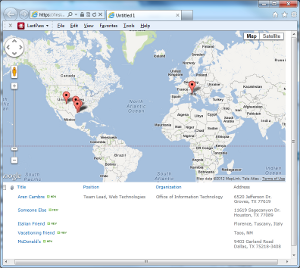
This explains how to show addresses in a SharePoint 2010 list on a Google Map.

This article is based on Kyle Shaeffer’s Plotting Your SharePoint 2010 List Data on a Google Map. The main difference is I upgraded his method to Google Maps API V3.

Here’s how it’s done:

Create a list

Using SharePoint Designer 2010 (free download!), open your SharePoint site and:

  1. Under Site Objects, click Lists and Libraries.
  2. In the Lists and Libraries tab, click Custom List.
  3.  Enter MyData and press OK.
  4. Click on your new list, then select Edit list columns in the Customization section.
  5. Add a Multi Lines of Text field using the Add New Column button at top left:. Name it Address.

Create data view

Still in SharePoint Designer 2010:

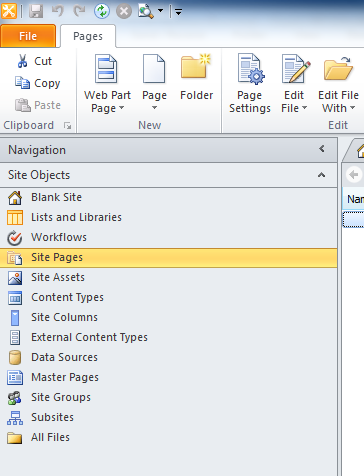
  1. Click Site Pages under Site Objects on the left:
  2.  In the ribbon at top, select Page > ASPX. Name your new page map.aspx.
  3. Click on the new page, then click Edit file in the Customization section. If asked to open the page in advanced mode, click Yes.
  4. Make sure that Design or Split are selected at bottom. From the menu at top: Insert > Data View > MyData

Now you’ll see your data in a table in the page.

Add the JavaScripts

You’ll need to reference two script libraries: Google’s Maps API and jQuery.

Find the opening <form> element in the source code. Right after it, paste this code:

<script type="text/javascript" src="https://maps.googleapis.com/maps/api/js?key=API_KEY_GOES_HERE&sensor=false"></script>
<script type="text/javascript" src="https://ajax.googleapis.com/ajax/libs/jquery/1.7.1/jquery.min.js"></script>
 
<div id="map_canvas" style="width: 98%; height: 400px"></div>
 
<script type="text/javascript">
// set up the basic map object
var latlng = new google.maps.LatLng(34.603885, -4.626009);
var myOptions = {
	zoom: 2,
	center: latlng,
	mapTypeId: google.maps.MapTypeId.ROADMAP
};
var map = new google.maps.Map(document.getElementById("map_canvas"), myOptions);
 
// this is used for geocoding
var geocoder = new google.maps.Geocoder();
 
function codeAddress(address, theName) {
    geocoder.geocode( { 'address': address}, function(results, status) {
      if (status == google.maps.GeocoderStatus.OK) {
        var marker = new google.maps.Marker({
            map: map,
            position: results[0].geometry.location
        });
      } else {
        alert("Geocode was not successful for the following reason: " + status);
      }
    });
}
 
// this is called with body's onload to pull addresses after the page is done loading.
function initialize() {
	$("tr.ms-itmhover").each(function(i){
		codeAddress($(this).find('.ms-rtestate-field:eq(0)').text(), $(this).find('.ms-vb-title:eq(0) a').text());
	});
}
</script>

Replace API_KEY_GOES_HERE with your own Google API key. Don’t have one? Get it at https://code.google.com/apis/console/. Be sure to get a Google Maps API v3 key! v2 is deprecated.

Now you need to add an onload attribute to your body tag to fire off the initialize function:

<body onload="initialize()">

Viola! You have a map that dynamically pulls from the below list!

Caveats

The initialize method works by scraping from the rendered HTML. It’s finding every tr with class ms-itmhover–which is what is produced by the data view you inserted above. Then within each of those trs, it finds:

  • The first item with class ms-rtestate-field and gets its text contents. This will be your address.
  • The contents of the a tag within the first element with class ms-vb-title, which is the title field.

You’ll have to do JavaScript surgery if you change fields in a way that alters this. For example, if another multi line text field displays before your address, you’ll have to change .ms-rtestate-field:eq(0) to .ms-rtestate-field:eq(1). Or you’ll need to alter the XSLT behind the data view to produce some other classes or code.

Also, because this uses JavaScript to scrape the screen’s contents, you must deliver the data list in the page . It doesn’t have to be visible–you can make it invisible with CSS. If you don’t want the data to be on the page, you’ll need to use more sophisticated techniques, possibly some kind of AJAX.

Hiding Active Directory user IDs from WordPress author slugs

I recently set up a corporate WordPress blog system. With the Active Directory Integration plugin, users can sign in with their corporate ID and password.

But here’s a problem: each blog post has a link to the author’s profile. That profile’s URL includes the user ID. The corporation’s security standards say we can’t expose user IDs to the world, so the author profile URLs have to be sanitized.

It took a while to figure out a solution, but the end result is reasonable.

I found this post at StackExchange’s WordPress site. Adding the first two code snippets (below) to the end of wp-config.php tells WordPress to use the user’s nickname metadata to construct the profile URLs:

add_filter( 'request', 'wpse5742_request' );function wpse5742_request( $query_vars )
 
{
 if ( array_key_exists( 'author_name', $query_vars ) ) {
 global $wpdb;
 $author_id = $wpdb-&gt;get_var( $wpdb-&gt;prepare( "SELECT user_id FROM {$wpdb-&gt;usermeta} WHERE meta_key='nickname' AND meta_value = %s", $query_vars['author_name'] ) );
 if ( $author_id ) {
 $query_vars['author'] = $author_id;
 unset( $query_vars['author_name'] );
 }
 }
 return $query_vars;
}
 
add_filter( 'author_link', 'wpse5742_author_link', 10, 3 );
function wpse5742_author_link( $link, $author_id, $author_nicename)
{
 $author_nickname = get_user_meta( $author_id, 'nickname', true );
 if ( $author_nickname ) {
 $link = str_replace( $author_nicename, $author_nickname, $link );
 }
 return $link;
}

But wait, there’s more!

Now you have to get a proper value into the nickname field. Active Directory Integration makes this easy. In this plugin’s settings, go to the User Meta tab and enter this into the Additional User Attributes field: mailnickname:string:nickname. You’ll may need to replace mailnickname with your own Active Directory user attribute if it isn’t appropriate for you.

That’s it. The next time a user logs in, the nickname field is updated, and all future profile URLs for that user will not have a user ID.

Skepticism of the law

I’m not a Lawrence Lessig fan. He’s too radical, but he still had a great quote last year:

…I am a little surprised by the respect that non lawyers typically give the law. Because lawyers’ view is one of constant skepticism. We constantly ask and demand of the law that it explain to us: How does this make sense? And we never presume that we happen to have a body of regulation that makes sense. We always examine. Where it does make sense, we say good for the law, and we encourage people to follow it. But where it makes no sense, our perspective is that the law needs to be changed.

He only encourages obedience to laws that make sense. Later he wrote “Stop believing, stop listening, stop deferring. Feel entitled to question this system.

(Getting Our Values around Copyright Right, EDUCAUSE Review, March/April 2010)

This is refreshing. Usually, I see the paintywaist viewpoint, that all law deserves to be obeyed just because it exists.

No!

Law is just an approximation of right and wrong. It’s often off.

Americans were once required to return slaves, but it was never wrong to ignore this law and help slaves become free. Similarly, suppose 75 mph is safe on a road. 75 mph is illegal if the speed limit sign says 65, but it’s not wrong.

Educause: Outsource the Transactional, Keep the Transformative

Educause’s recent Outsource the Transactional, Keep the Transformative complements my recent article questioning the value of IT projects.

In my article, I said that work  easily expressed as a classical/waterfall project probably has less intrinsic business value. This includes stuff like routine infrastructure and commodity services.

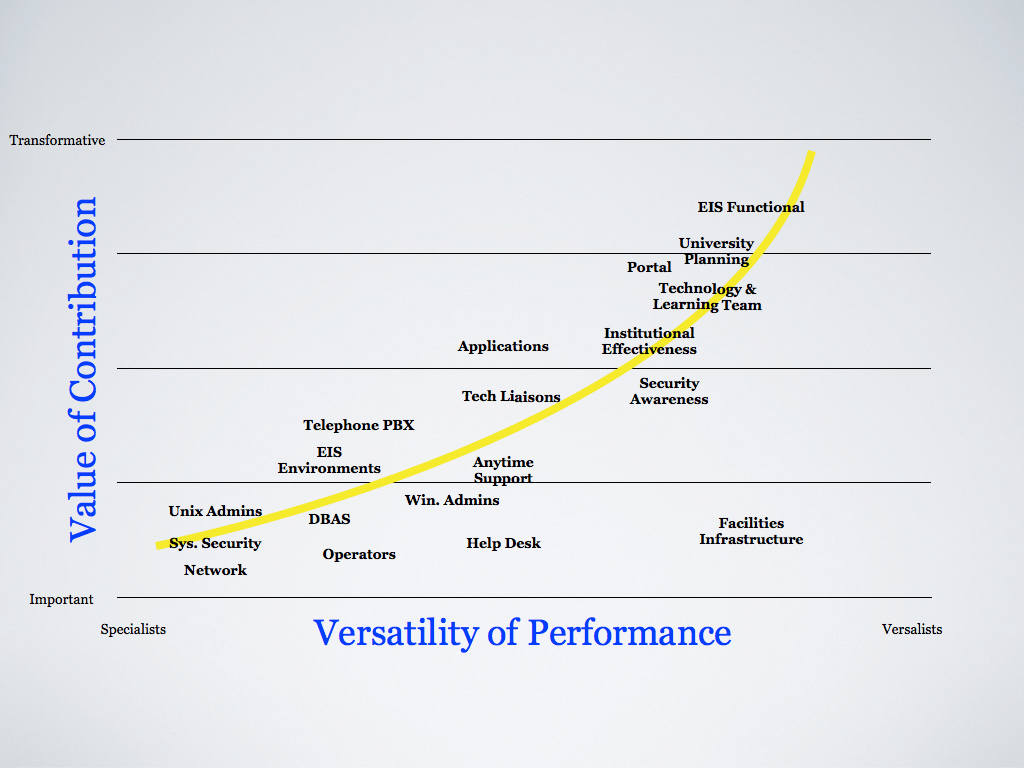
The Educause piece has a graph showing how Pepperdine University rated the value of its in-house IT services:

(Click the image to see the full size.)

Sampling of services with lowest value or transformative potential, mostly the stuff of process or where classical/waterfall projects are normative:

  • Windows administration
  • Security
  • DBAs
  • Help Desk (outsourcing this is the theme of the Educause article)

And services with the highest value or transformative potential, the stuff of agility:

  • EIS functional (basically business analysts)
  • Portal
  • Technology & Learning Team
  • University Planning (basically enterprise architecture)

I chuckled at security’s inclusion in the least value segment. Security has always lived in a halo of insecurity; their value is in what didn’t happen. How do you express that? Regardless, you’d be crazy not to have a good security team.

How about the rest? Does this mean Windows administrators, DBAs, help desk staff, etc. should quake in their boots?

Depends. In the near term, I don’t see a sea change, but I also don’t see growing opportunities for work on the bottom left of the graph. Long-term, the outsourcing question is “when”, not “if”. And until then, the value of work on the bottom left isn’t intrinsic; it’s measured by what it enables the people on the top right to do. If the bottom lefters aren’t helping the top righters, they are nailing their own coffin.

Once the outsourcing begins, I’d hope that it results in either:

  1. Equivalent position at the outsourcer. I saw a university do this when it outsourced its trades department (HVAC, plumbing, landscaping, etc.). If you enjoy the trade, this can be good; you’ll probably have more growth opportunities versus pigeonholing with an employer where your trade is ephemeral. This is already happening to pure-play programmers, too, but that’s a subject for a different day.
  2. You get reassigned within the original employer. This is what Pepperdine did (see bottom of page 1 of this). But–and this is a big but!–it’s only going to work if you’re versatile and able. If you’re a one shot wonder, have little skills depth, or find it difficult to adapt, this could be the beginning of a downward spiral.

So what to make of this? Two things.

First, if your job is routine, process-driven, or involves a lot of waterfall projects, you may not be high on the business value ladder. These positions will be scrutinized. Make sure you are versatile enough to merit and survive reassignment.

Second, watch what’s going on around you. Where are you, your immediate coworkers, and your department headed? Is the cliched “writing on the wall”? Sometimes, you need to be proactive and transform yourself up the business value ladder.

Transformation, agility, and business value are the future of IT. Process and waterfall’s share of that future is declining. Be prepared.